
For accounting firms & bookkeepers

Practice management with an AI co‑worker built in.

Other tools organize your firm’s work. Accountant.World also does it: Kiko categorizes, reconciles, and drafts entries across every client, and your team approves the judgment calls and spends the time on advisory.

  • No per-seat fees
  • Workflow, portal & proposals included
  • Import clients from QuickBooks Online
Firm queue · this morning
Northwind Studio
142 transactions categorized
CloseReady to review
Harbor & Pine
Rent accrual drafted
AdjustNeeds approval
Lumen Freight
3 receipts missing
RequestDraft to client
Harbor & Pine · needs approval
Accrue September rent of $3,200.00
DebitCredit
Rent Expense3,200.00
Accrued Liabilities3,200.00
Why: the lease schedule shows rent due Sep 30 and no payment has cleared.
ApproveEditReject
How it works

Your staff review. Kiko does the prep.

The same team can serve more clients, because the repetitive bookkeeping arrives already done and waiting for a professional’s sign-off.

1

Bring your clients

Import each client from QuickBooks Online, connect their bank, Stripe, BILL, and Gusto, and set up engagements from templates.

2

Kiko prepares every client

Overnight Kiko categorizes, reconciles, reads documents, and drafts entries and client requests across your whole book of business.

3

Your team approves and advises

Staff work one queue of approval cards with Kiko’s reasoning attached, then spend the saved hours on reviews and advisory.

The real product

This is what Accountant.World looks like

Actual Accountant.World screens. Firm, staff, and client names are demo data.

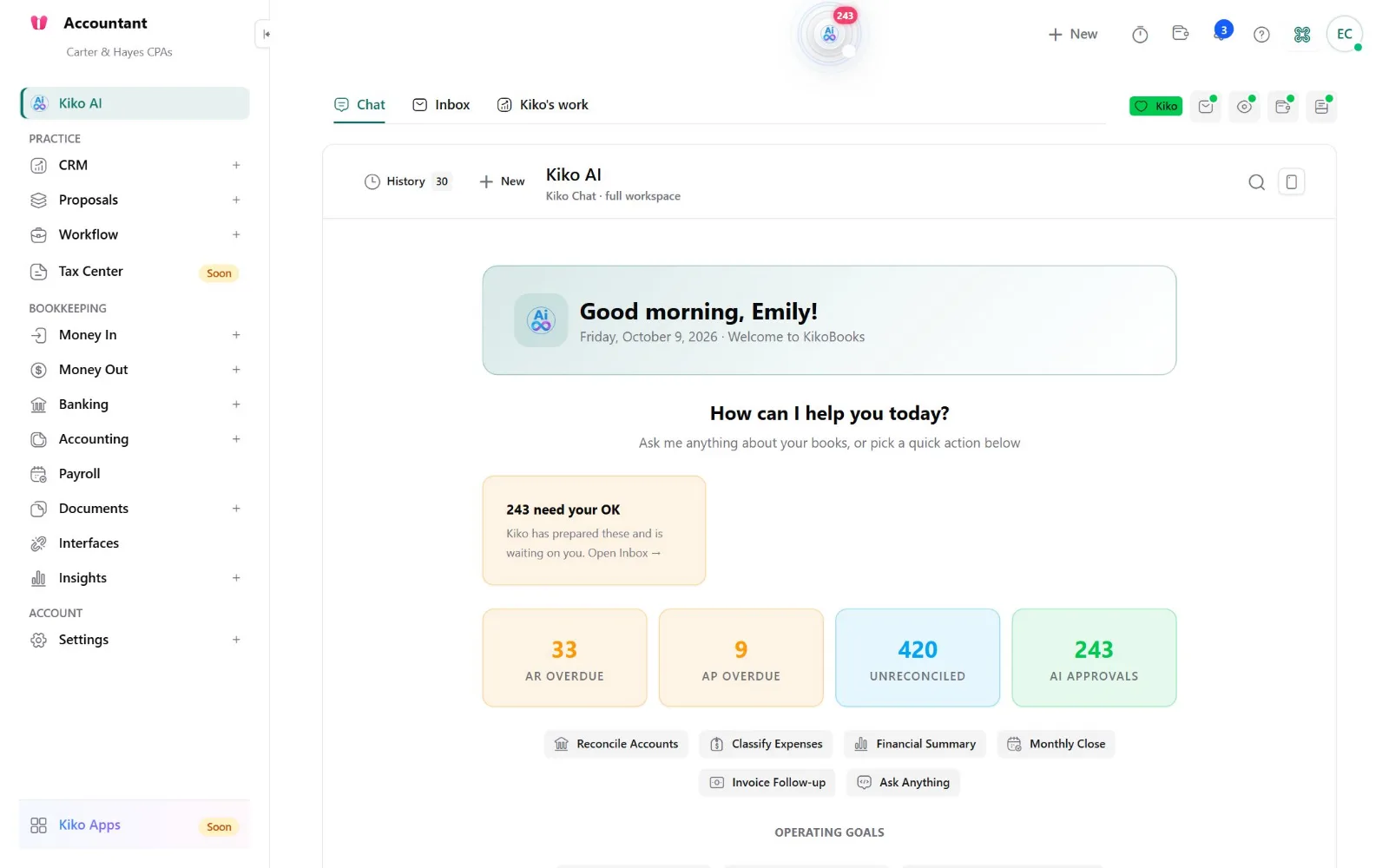
Kiko AI · firm home
Accountant.World Kiko AI home with Practice and Bookkeeping menus, overdue AR and AP, unreconciled items, and approvals waiting for staff
Practice and bookkeeping in one workspace. CRM, proposals, and workflow sit beside every client’s books, with Kiko’s prepared work waiting for staff sign-off.
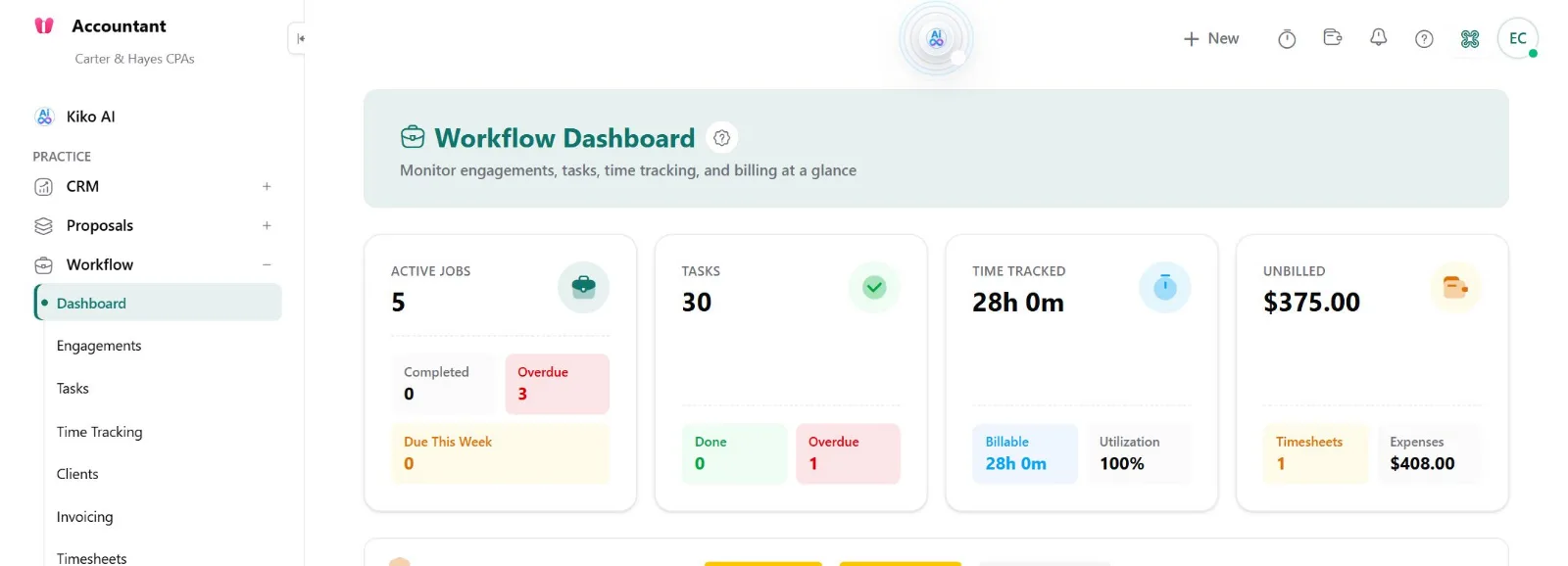
Workflow · dashboard
Accountant.World workflow dashboard with active jobs, tasks, time tracked, and unbilled amounts
The whole firm at a glance. Jobs, tasks, time, and unbilled work.
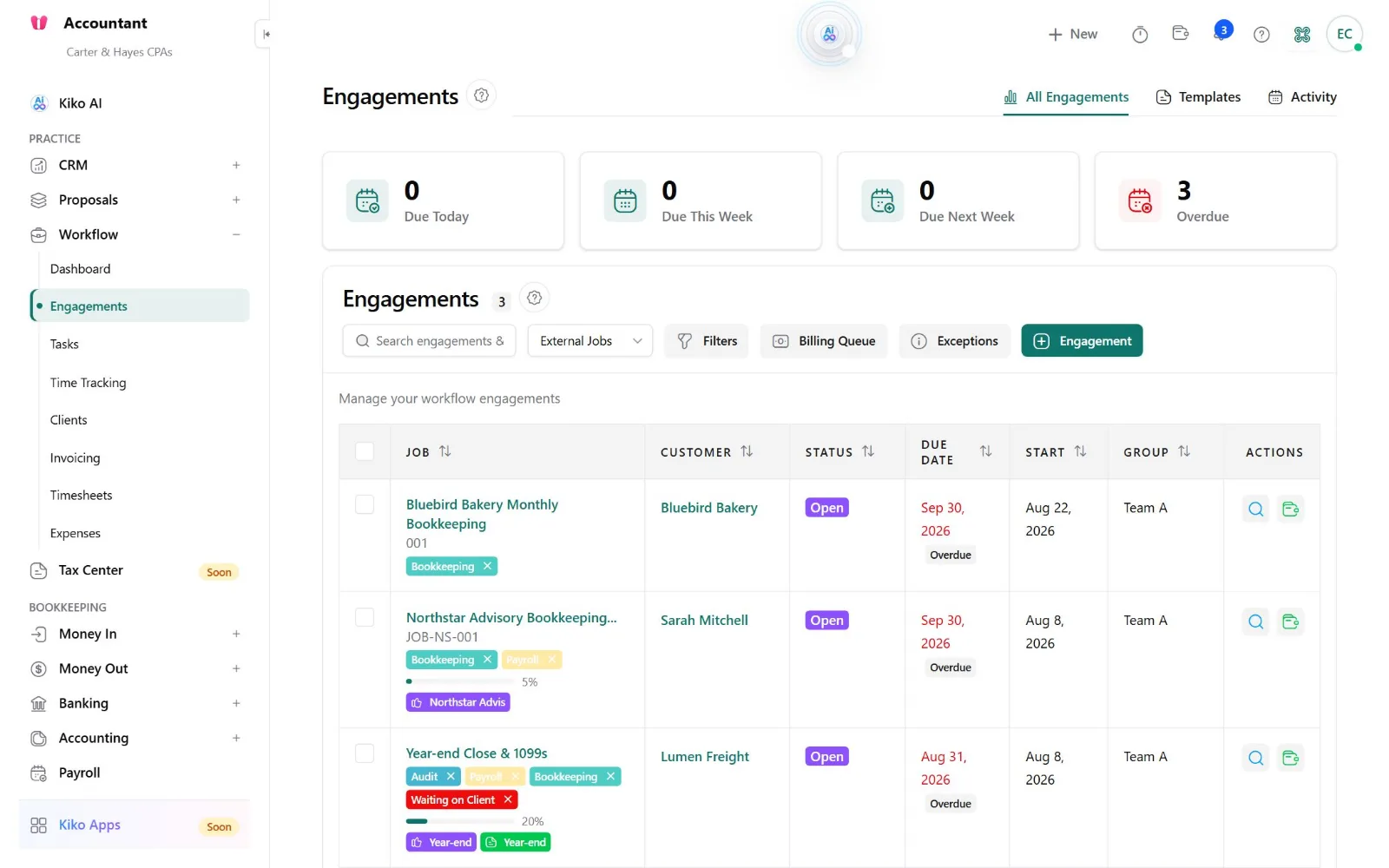
Workflow · engagements
Accountant.World engagements list with due dates, status, service tags, and progress
Every engagement tracked. Due dates, overdue flags, service tags, and progress per client.
Workflow & deadlines

Every engagement, every deadline, one view

Recurring engagements run from templates with tasks, dependencies, and due dates, and the firm-wide view shows what is late before it is a problem.

  • Templates for monthly close, payroll review, 1099 season, and advisory
  • Task assignment, capacity, and staff scheduling across the team
  • Kiko suggests, assigns, and updates tasks within the permissions you set
Engagements · October
Monthly close · Northwind
Owner: Emily · due Oct 10
8/10In review
Payroll review · Harbor & Pine
Owner: Sam · due Oct 6
3/5Due soon
Year-end planning · 12 clients
Owner: Jordan · due Nov 15
1/9On track
Client portal & requests

Stop chasing clients for documents

Clients upload, sign, and answer in one secure portal. Kiko notices what’s missing and drafts the request for your approval.

  • Document requests and checklists clients can complete from any device
  • Messages, tasks, and signed documents in one place, with an audit trail
  • Client Pairing lets clients ask Kiko about their own books within your guardrails
Client portal · Lumen Freight
September bank statement
Uploaded Oct 3
Received
3 fuel receipts over $75
Requested Oct 4
Waiting
Draft reminder
Remind Lumen Freight about 3 receipts
Kiko drafted a polite follow-up with the transaction dates. It waits for your approval before sending.
SendEditNot now
Proposals, time & billing

From signed proposal to paid invoice

Send branded proposals with engagement letters and e-signature, turn the signed one into a project, track time against it, and invoice from the same record.

  • Proposals with e-signature and view tracking
  • Signed proposal to project to invoice, without retyping
  • Billable time tracked in the workflow, invoiced in a click
  • CRM pipeline from first inquiry to engagement
Proposal · Bluebird Bakery
$950/moBookkeeping
$1,800Year-end
SignedOct 2
Project created
Monthly bookkeeping engagement
Done
First invoice
INV-2210 · due Nov 1
$950.00Sent
Professional judgment stays with your team

Kiko sorts every action by risk, not by how sure it feels

Your firm signs off on the work. KikoBooks follows clear rules about what the AI may do alone and what always needs a professional.

Works freelyRead, sort, draftLooks things up, categorizes, summarizes, and prepares drafts. No client’s books change.
Posts by ruleRules mapped onceBank rules and each client’s mapped Stripe, BILL, and Gusto activity post through the same audited engine.
Asks your staffJudgment callsAdjusting entries, accruals, reclasses, write-offs, and credit memos come with Kiko’s reasoning for review.
Always yoursClients and moneyAnything sent to a client and every payment needs a sign-off. Posted entries are only ever reversed, never edited.
Meet the team

One co-worker, nine specialists behind it

Your staff talk to Kiko. Kiko routes each job to the specialist built for it, across every client you serve.

KikoYour firm’s co-worker in chat, email, and voice
LedgerAR, AP, and journal entries per client
BankCategorizing, matching, reconciling
DocIntelReads client bills and statements
ComplianceReviews drafts; can veto them
PracticeEngagements, CRM, and proposals
SyncKeeps client connections healthy
OnboardNew-client setup and imports
WatcherSpots unusual activity early
PlatformFirm settings, roles, AI wallet
Everything a firm runs on

Included, not sold as add-ons

CRM & client records

Every client relationship from lead to engagement, linked to their workflows, proposals, invoices, and documents.

Document management

Client files with folder templates, requests through the portal, and AI extraction that turns receipts and statements into data.

Client integrations

QuickBooks Online import, Stripe, BILL, Gusto, Brex, Ramp, bank feeds, and 14 sales channels for e-commerce clients.

Email and voice

Kiko sends client updates and places follow-up calls your staff approve. It never texts or answers inbound calls.

Your firm’s AI tools

Connect Claude, Cursor, or Copilot to client books with one API key per client through the KikoBooks MCP server.

Security

Each client isolated, encrypted on Microsoft Azure, with role-based permissions and an immutable ledger. Details

Example scenarios

A month inside a firm using Kiko

How firms run on Accountant.World day to day. These are illustrative examples, not customer testimonials.

E

Emily Carter · Carter & Hayes CPAs

A four-person CPA firm in Denver, Colorado doing monthly bookkeeping, payroll review, and year-end work for about 60 small-business clients.

Illustrative example
  1. Day 1Emily imports her first ten clients from QuickBooks Online and creates engagements from the monthly-close template, each with tasks, owners, and due dates.
  2. Every morningHer staff open one queue. Kiko has already categorized and matched each client’s bank activity overnight; what’s left are approval cards with Kiko’s reasoning attached.
  3. Week 2A client is missing three receipts. Kiko drafts the portal request with the transaction dates; a staff member approves it, and the client uploads from their phone.
  4. Week 3Kiko drafts a rent accrual for a client whose lease payment hasn’t cleared. A senior accountant reviews the entry and approves it; nothing posts until she does.
  5. Month endEmily checks the workflow dashboard for overdue engagements and unbilled time, then invoices from tracked hours. No per-seat fees, so adding a fifth hire doesn’t change the software bill.
M

Marcus Reed · Reed Bookkeeping

A solo bookkeeper in Austin, Texas serving e-commerce and service clients, several of whom already use KikoBooks.

Illustrative example
  1. OnboardingTwo clients already on KikoBooks invite Marcus through My Accountant. He works in their books directly, with the permissions they chose.
  2. WeeklyFor an Amazon seller, he uploads the settlement statement; Kiko verifies the math and drafts the split between sales, fees, refunds, and tax for his review.
  3. New businessHe sends a proposal with an engagement letter. When the prospect signs, the proposal becomes a project and the first invoice is ready to send.
  4. Tax seasonHe tracks 1099 season as an engagement and pulls vendor totals from each client’s 1099 list. The Tax Center for transcripts and filing is still on the roadmap, so returns stay in his existing tax software.

People and firms in these scenarios are fictional and used to illustrate product workflows.

Pricing

No per-seat fees. Pay for the work Kiko does.

Add staff without your software bill multiplying. The whole platform is included; AI usage is metered from a prepaid wallet, with live rates in the app.

$0

to set up your firm, invite your team, and bring over clients.

  • CRM, workflow, portal, proposals, e-signature, time, billing, and documents included
  • Per-agent budgets, low-balance limits, and optional auto top-up
  • Every charge recorded in your wallet history

Metered from your wallet as you use it:

  • AI workper task Kiko performs
  • Document readingper bill, receipt, or statement
  • Client email & voiceper message or call you approve
  • Storagebeyond the included amount
  • Provider feespassed through at cost
Honest comparison

How Accountant.World compares

Good firms run on all of these. Here is who each one fits, based on their public websites as of October 2026.

vs Karbon

Collaborative practice management with a mature email-to-work inbox, an AI coworker, and a large firm community, priced per user.

Choose Karbon if your firm runs on email triage and wants the most established workflow community.

Choose Accountant.World if you want the AI to do the bookkeeping itself, inside the ledger your clients use, and pay for usage instead of seats.

vs Financial Cents

Approachable workflow and client-request software with a deep template library and simple per-seat pricing.

Choose Financial Cents if you mainly need checklists, client requests, and templates at a predictable per-seat price.

Choose Accountant.World if you want workflow plus the books themselves, prepared by Kiko for your approval.

vs Canopy

An all-in-one platform for tax-focused firms with documents, billing, and tax-resolution tools.

Choose Canopy if tax resolution and IRS transcript work are the center of your practice today.

Choose Accountant.World if bookkeeping and client accounting are your core service and you want an AI co-worker in every client’s ledger.

Built with firms

Your requests shape the roadmap

Accountant.World improves from the requests firms send in. AI helps us build faster; a person reviews and approves every change before it reaches client books.

Ask Kiko or Support

Tell Kiko what isn’t working or what your firm needs. Kiko drafts the request and files it once you confirm, or open Support yourself.

Firms vote

Ideas shared publicly can be upvoted by other firms and owners. Votes raise a request’s priority.

People approve every release

Requests are sorted daily. Our AI engineering agents prepare fixes, and you get an email at each status change, plus everyone who voted when it ships.

On the roadmap

Coming soon

Coming soon

Tax Center

IRS transcript retrieval and business tax filing, with AI-assisted validation before you submit.

Coming soon

Kiko Apps

A marketplace to extend your practice with curated integrations and add-ons.

FAQ

Questions firms ask

How is Accountant.World priced?
Free to start with no per-seat fees. AI work, document processing, and communications are metered from a prepaid wallet with live rates in the app. Set per-agent budgets and limits so spend stays predictable.
Does Kiko post to client books on its own?
Only for rules a client has mapped once, such as bank rules and Stripe, BILL, and Gusto activity, which post through the same audited engine. Adjusting entries, write-offs, credit memos, and anything sent to a client come to your staff as approval cards. Posted entries are never edited, only reversed.
Can I bring clients over from QuickBooks Online?
Yes. Each client’s customers, vendors, chart of accounts, and recent transactions import from QuickBooks Online, with a review before anything is finalized.
Can clients who use KikoBooks work with my firm?
Yes. Business owners on KikoBooks can invite your firm into their books with the permissions they choose, so you work in the same ledger they do.
Does Accountant.World prepare tax returns?
Not yet. Tax workflows and deadlines run in Practice today; the Tax Center for IRS transcripts and business filing is on the roadmap.
Can my firm request features?
Yes. Tell Kiko, or open Support and choose “I have an idea.” Requests shared publicly can be upvoted, votes raise priority, and you get an email when the status changes. How we build.
How is client data protected?
Each client’s data is isolated, encrypted in transit and at rest on Microsoft Azure, and protected by role-based permissions and an immutable ledger. Read about security.

See Kiko on your own client work

Start free, or bring a real client file and we’ll walk your team through categorization, reconciliation, and approvals live.